
Get Started with NoveList Plus
Not sure what to read next? Whether you're in the mood for a gripping mystery, a feel-good romance, or something completely different, NoveList Plus online resource for adult readers is a great place to start your search.
You can access this free database of over 250,000 recommended reads remotely with your Burlington Public Library card number or without a card when inside a branch. NoveList Plus interfaces with BPL’s online catalogue, so you can instantly see if the library owns a copy of any titles that interest you.
At first glance, NoveList Plus might seem like a lot to take in—it’s packed with reading suggestions, reviews, and tools to help you explore. But thanks to its clear and easy-to-use menu system, finding your next great read is easy and fun. Take your time and play—we guarantee you’ll find the results rewarding!
NoveList Plus in a Nutshell
There are so many ways to explore this massive information storehouse—you'll find the way that works best for you the more you use it. So, let’s get started—sign in with your BPL card number from the library website.
Once inside, there are three main sections on the home page to guide your search, each one designed to meet your needs with little fuss: keyword search top menu, browsing, and links side menu.
Tip!
How you begin your search depends on what you want to find. Decide if you want to search for a specific book, author, or series (Keyword) OR if you’re browsing, looking for reading suggestions, curated booklists etc.
Keyword Search Top Menu
The simplest way to search is by keyword, which is the default in the top main menu. You can search by book title, author, or series. You can also narrow your search using filters, such as publication dates or award winners.
Browsing Section
Recent changes to the NoveList home page have made browsing a breeze. In the centre of the main section of the page, you’ll find at-a-glance sections like:
- Books With Buzz for noteworthy and trending titles. Click on the Media Mentions Index to see what books are being talked about on popular shows, by celebrities, and adapted for the screen.
- Curated Lists of books geared to specific ages, sorted by fiction or non-fiction, and by popular categories such as Must reads, Seasonal reads, and Trending now. Or you can settle in for some serious list-bingeing and select View 327 lists!
- Explore Titles by Story Element, such as ‘gritty,’ ‘plot-driven,’ ‘category romances,’ and ‘likeable characters.’
- New Series Titles
- Start Browsing, which offers 12 more enticing categories, like Appeal Factors, Audiobooks, and Book Club Best Bets.
Links Side Menu
The side menu provides shortcuts to many of the features on the main page. This is a handy way to navigate the site if you are already familiar with its features.
The site also offers excellent in-depth instruction on using NoveList Plus in the How do I? section of the side menu. We highly recommend exploring this section to make the most of your NoveList Plus experience.
Bonus!
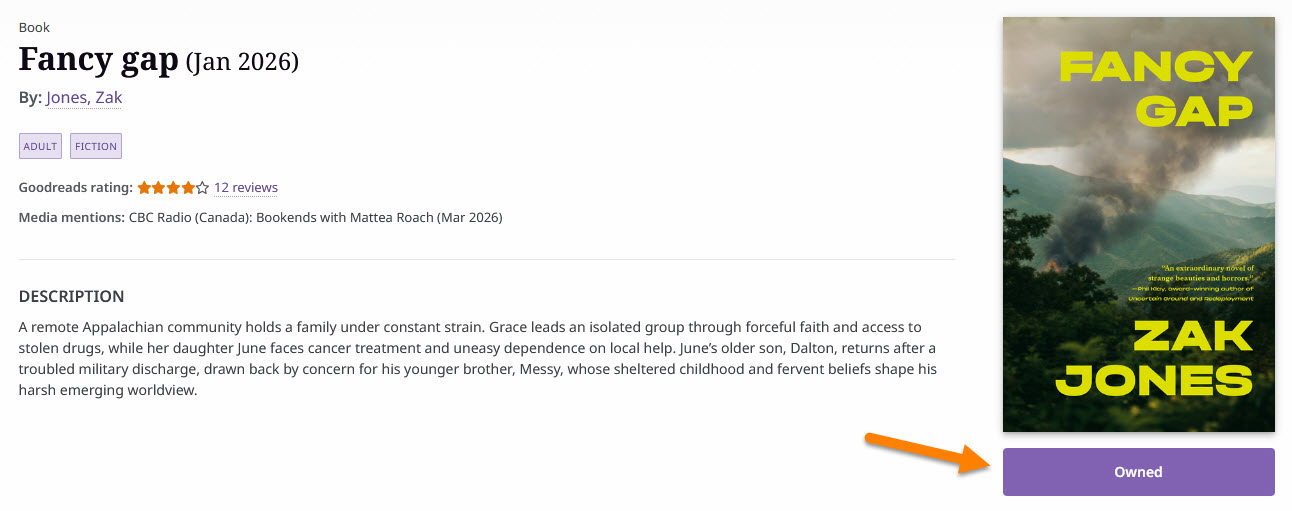
When you click on a title, you will see its Availability status—either ‘Owned’ or ‘Not owned’ by Burlington Public Library. You can then sign into your My BPL account to place a hold.
Endless Possibilities
NoveList Plus makes searching for new titles feel like a book lover’s adventure. You'll find volumes of hidden gems to add to your To-Read list, just waiting for you on our shelves.
NoveList for Younger Readers
Along with NoveList Plus, BPL cardholders can access NoveList K-8 Plus. Organized exactly like the adult edition, NoveList K-8 Plus helps kids in Kindergarten to Grade 8 find books that are just right for their reading level and interests.
Where to Find NoveList Plus
Select RESOURCES on BPL’s website main menu to find NoveList Plus under eBooks & eAudiobooks. Connect directly to the online resource or select 'More Info' to read how to access NoveList Plus. NoveList Plus does not have a dedicated mobile app.